Map drive | How to disable Open File security warning on Windows 10/11

Question:
How can I disable Open File security warning on Windows 10?

Change Local intranet settings
Open Internet Options. We showed you how to do that in Solution 1, so be sure to check it for detailed instructions.
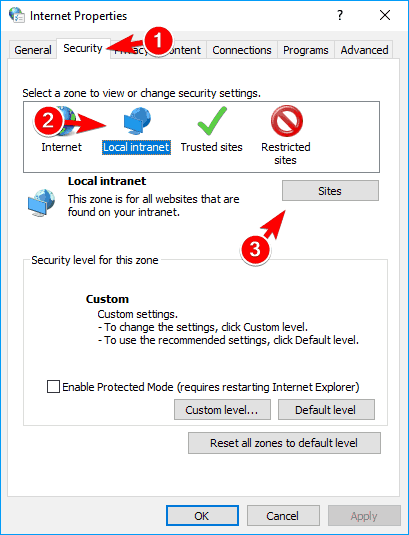
When the Internet Properties window opens, go to the Security tab and select Local intranet. Now click on the Sites button.
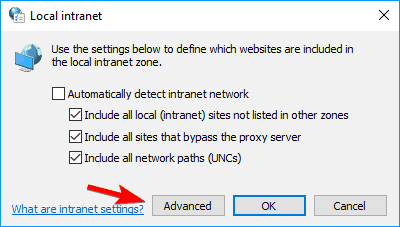
- The local intranet window will now appear. Click on the Advanced button.
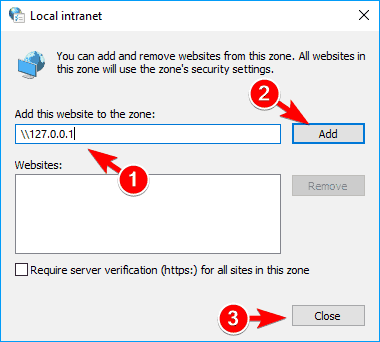
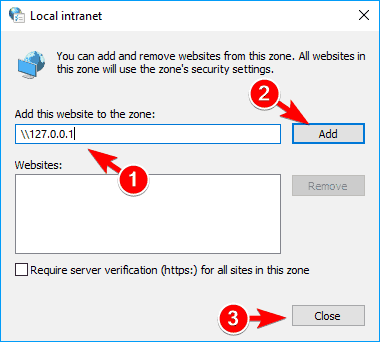
- Now enter the address of the server in the Add this website to the zone field. You can use the server’s domain or you can use its IP address.
- Just be sure to enter before the server’s address or domain. Now click on the Add button. After you’re done adding servers, click the Close button.
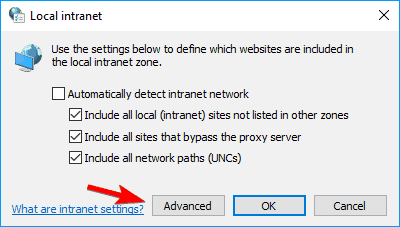
- Save changes and your problem should be resolved completely.

Related Articles
No icon on network shortcuts on Windows 11 Pro
Issue: Custom icons do not display correctly over network map drives. The issues started when computers upgraded to Windows 10 and 11. Explanation: The issue is caused by Microsoft's attempt to cache the icon locally, but the icon is saved over the ...Duplicate order number checking for processing modules in IQ
Question: Is it possible to check the system for duplicate order numbers per Debtor? To enable duplicate order number checking for processing modules in IQ, follow these steps: 1. Navigate to Company Setup Go to the Utilities menu at the top of the ...Utilities | User and Security | Security | Multiple Factor Authentication (MFA)
Starting from IQ version 2025.9.0.0, Multifactor Authentication (MFA) has been introduced to further enhance system security. MFA adds an additional layer of protection for: User logins Security overrides For the purpose of this guide, we demonstrate ...System Overview and Recommendations
IQ/ERP Go is a capable system, but it is not fully optimized for modern operating environments. To ensure smooth operation, certain configurations and adjustments are required on both the server and client operating systems. Please note that IQ/ERP ...Loyalty Plus | Utilities | User Security
Question How do I enable the loyalty button for cashiers in Point of Sale? Article relates to Signing up customers Navigation You need to login in as an Administrator on the system. Click on Utilities Click on Setup Click on Menu Security Access and ...