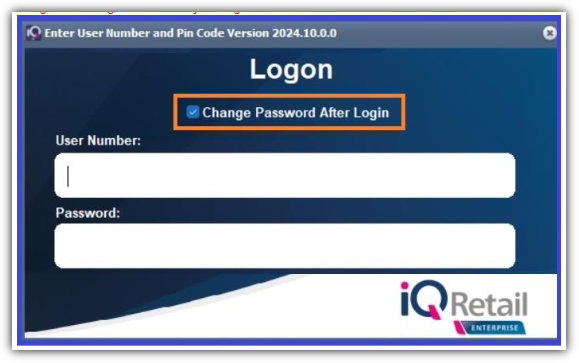
IQ Security | “Change Password After Login”
Version:
2024.10.0.0
Overview:
A checkbox was added to login screen which, when enabled, will allow users to change their password after login.
Related Articles
Stock | Utilities | Stock Take | CipherLab Mobile Computer 8230 Wifi | Device configuration for IQ
Introduction This document provides guidance on setting up the CipherLab Mobile Computer 8230 for use during stock-taking procedures in the IQ system. For demonstration and testing purposes, version 2025.8.0.1 has been used. Important Notice From ...IQ Security | ‘Reveal Password Control’ added to logon screen
Version: 2024.9.0.0 and higher Overview: ‘Reveal password control’ (small eye icon) was added to the logon password field. Clicking said button will temporarily reveal an already typed in password that’s otherwise masked by asterisks. Password will ...Duplicate order number checking for processing modules in IQ
Question: Is it possible to check the system for duplicate order numbers per Debtor? To enable duplicate order number checking for processing modules in IQ, follow these steps: 1. Navigate to Company Setup Go to the Utilities menu at the top of the ...Utilities | User and Security | Security | Multiple Factor Authentication (MFA)
Starting from IQ version 2025.9.0.0, Multifactor Authentication (MFA) has been introduced to further enhance system security. MFA adds an additional layer of protection for: User logins Security overrides For the purpose of this guide, we demonstrate ...Processing | Cannot change the account?
Version: 2024.2.0.0 and higher Issue: Since we have upgraded to version 2024.2.0.0, I am unable to change the account. I made a mistake on the sales order and now I cannot change the account? I use to double click on the Account No label to change ...